 TritonPanels
The short answer
Start with your files, not the feature list. Check that the app opens the formats you actually have and reaches the place they live, whether that is the phone, a cloud service, a network drive or your own comic server. Then check how it reads (page modes, manga direction, panel-by-panel on a phone), how it handles offline, and whether its privacy and pricing suit you. Everything else is preference. The table at the end works as a printable checklist.
1. Formats
Digital comics are mostly CBZ (a ZIP of images), CBR (a RAR of images), PDF and EPUB, with CB7 and CBT turning up in older collections. Two caveats catch people out. CBR files made with newer versions of WinRAR may use the RAR5 format, which many readers cannot open. And EPUB covers two very different things: fixed-layout, image-based comics, and reflowable text books. Test a few of your oddest files during a trial.
TritonPanels: CBZ, CBR (RAR4), CB7, CBT and compressed TAR, PDF, and image-based EPUB, with a wide range of page image formats. RAR5, CBA and text-only EPUB are not supported, and nothing copy-protected opens. It reads ComicInfo.xml and detects a file’s real format, so a misnamed file still opens. See opening CBZ and CBR files.
2. Where your files live
This is the question that rules apps out fastest. If your collection lives on a NAS, a home server or a cloud service, the reader has to reach it, and ideally read it in place rather than making you copy everything. If you run a comic server, check the app supports it and whether reading progress goes back to the server.
TritonPanels: imports from the device, Google Drive, Dropbox and OneDrive; reads folders on the device, SD cards and USB drives, iCloud Drive (iOS), Dropbox folders and SMB network shares in place; follows free Substack publications; and connects to Komga and Kavita (progress kept in step with the server both ways), Calibre and other OPDS catalogues (progress stays on the device). It talks to your server directly, with nothing in between.
3. Reading modes
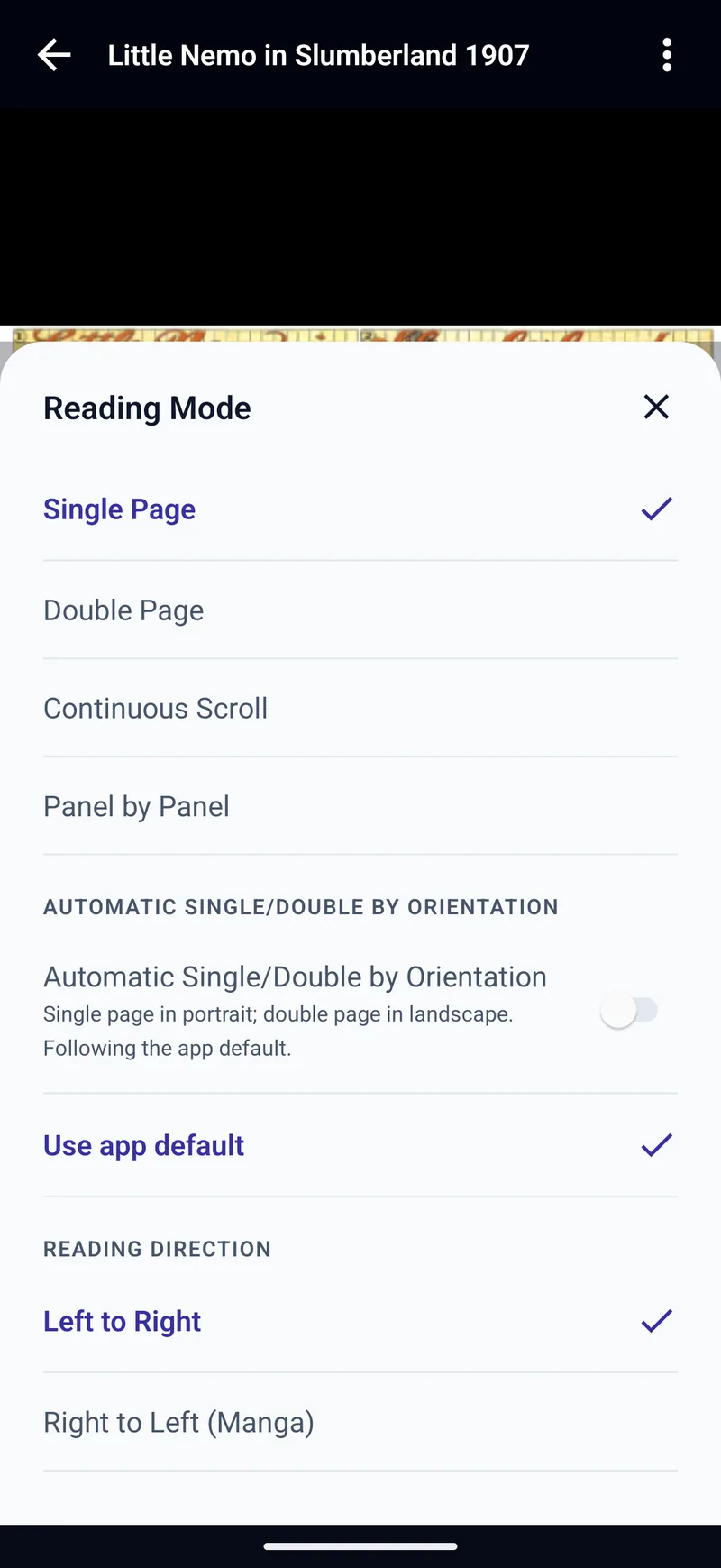
A full comic page on a phone screen is small. Look for a reader that gives you a choice: single page, two-page spreads for tablets in landscape, continuous scroll for webcomics, and panel-by-panel for phones. Manga readers need right-to-left reading that applies to page turns and spreads, not just a mirrored button.
TritonPanels: Single Page, Double Page, Continuous Scroll and Panel by Panel, with Left to Right or Right to Left (Manga). Panels are found on the device and nothing is uploaded. It also has reader presets, custom tap zones and page turns from a keyboard, game controller or media remote. More in panel-by-panel reading.
4. Offline reading
If your comics come from a server or the cloud, find out exactly what happens without a connection. Can you choose what stays on the device? Will the app quietly delete a download to make room?
TritonPanels: imported comics are always on the device. For other sources, Keep offline works on a comic, a folder or a whole library, and kept comics are never removed to free space. One Downloads screen shows the queue, with a Wi-Fi-only option. See reading comics offline.
5. Library organisation and metadata
A few dozen comics need nothing. A few thousand need metadata support, search that looks beyond filenames, and some way of grouping and ordering that does not mean renaming files.
TritonPanels: several libraries; nested folders with colours, symbols and covers; reading lists, tags and favourites; filters and sorts; search across all libraries by title, series, author, publisher or tag; Reading Now and Recently imported. See organising a digital comic collection.
6. Privacy, ads and pricing
Privacy and ads
A reader sees everything you read. Check whether it shows ads, requires an account, sends your library or reading history to a server, and what it collects. The app store privacy labels are a good starting point.
TritonPanels: no ads, no account and no TritonApps server. Comics and reading progress stay on the device; only anonymous crash reports are sent. Incognito reading, a passcode content lock and a privacy screen are built in. See reading comics privately.
Pricing model
Comic readers are sold in three broad ways. Free apps are paid for somehow, often by ads or by selling comics. One-off purchases are simple, but development has to be funded by new sales. Subscriptions cost more over the years but pay for continued work. None is wrong; pick the model you are comfortable with, and use any trial to test your own files.
TritonPanels is subscription-only: a 14-day free trial, then monthly or yearly. There is no free version and no lifetime purchase. Prices come from the App Store or Google Play and vary by region.
7. Platforms, accessibility and language
Check the app runs on every device you read on, including tablets in both orientations, and that it supports the accessibility features you rely on and an interface language you are comfortable with.
TritonPanels: iPhone and iPad (iOS / iPadOS 17.0 or later) and Android 7.0 or later, in any orientation. Themes include high-contrast light and dark, and the Android app has been audited with the TalkBack screen reader. The interface is available in 20 languages.
The checklist
| Feature | Why it matters | TritonPanels |
|---|---|---|
| Formats | A file that will not open is the commonest disappointment | CBZ, CBR (RAR4), CB7, CBT, PDF, image-based EPUB. Not RAR5 or DRM |
| Metadata | Sorting and search beyond filenames | Reads ComicInfo.xml, falls back to the filename |
| Cloud | Your files may already be there | Google Drive, Dropbox, OneDrive; iCloud Drive and Dropbox folders read in place |
| Local network | Big collections live on a NAS or PC | SMB 2 and 3 shares; Transfer over Wi-Fi |
| Comic servers | Self-hosted libraries and progress | Komga and Kavita (two-way progress); Calibre and OPDS (read-only) |
| Reading modes | Phones need panels, tablets need spreads | Single, Double, Continuous Scroll, Panel by Panel |
| Manga | Right-to-left reading done properly | Right to Left (Manga), including panel order |
| Offline | Flights, trains, patchy signal | Keep offline per comic, folder or library |
| Organisation | Finding one issue in thousands | Libraries, nested folders, reading lists, tags, search all libraries |
| Privacy | Your reading is your business | No ads, no account, data stays on the device |
| Pricing | Total cost and what pays for updates | Subscription only, 14-day free trial, no free version |
| Platforms | Every device you read on | iOS / iPadOS 17.0+, Android 7.0+ |
| Language | Comfort, and for some readers access | 20 interface languages |
Whatever you choose, use the trial on your own collection: the oddest files, the furthest server and the comic you most want to read on the train. That tells you more than any review.
Frequently asked questions
What file formats should a comic reader support?
At least CBZ, CBR, PDF and image-based EPUB, which covers most collections. Check RAR5 CBR files separately, because many readers cannot open them, and remember that DRM-protected comics only open in the seller’s own app.
Is TritonPanels free?
No. TritonPanels requires a subscription, monthly or yearly, after a 14-day free trial. There is no free version and no lifetime purchase. Prices are shown in the App Store or Google Play and vary by region.
Does TritonPanels sync reading progress?
With Komga and Kavita servers, reading progress is kept in step with the server both ways. Otherwise, progress is stored on the device. With Calibre and other OPDS catalogues it stays on the device.
Does TritonPanels show ads or need an account?
No. There are no ads and no account, and there is no TritonApps server holding your comics or reading history. Only anonymous crash reports are sent.
Read your comics with TritonPanels
A comic and manga reader for iPhone, iPad and Android. CBZ, CBR, CB7, CBT, PDF and image-based EPUB from your device, your cloud, a network share or your own Komga, Kavita or OPDS server — single page, spreads, continuous scroll or Panel by Panel. No ads, no account. 14-day free trial, then a monthly or yearly subscription.
Your own files: TritonPanels reads comics you already have. It does not sell, host or supply comics, and it cannot open copy-protected (DRM) purchases that are locked to another store’s app. Komga, Kavita, Calibre, Dropbox and the other names on this page belong to their owners, who do not endorse TritonPanels.