 TritonPanels
Two pages on an iPad
A tablet is wide enough for a printed spread. In TritonPanels, Double Page shows two pages side by side. Turn on Automatic Single/Double by Orientation and the iPad uses one page upright and a spread when you turn it sideways. The cover, and any page that is already a wide image, stay on their own. The setup steps, page fit and keyboard or controller turns are in reading comics on an iPad or Android tablet.
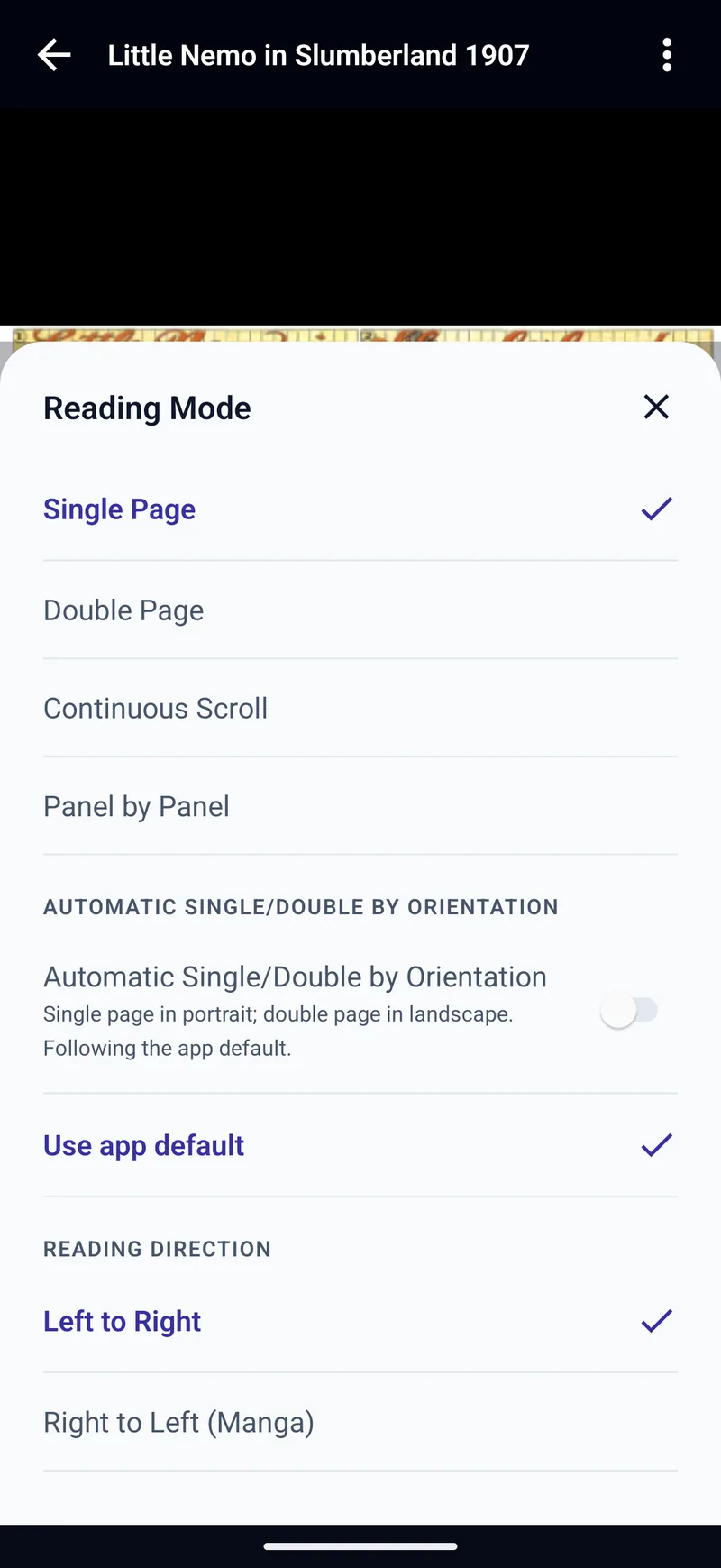
Double Page is not available for PDF, which stays one page at a time. Page fit can be Automatic, Fit Width, Fit Height, Fit Screen, Fill Screen or Original Size. Background can be black, matched to the page, or a soft blur of the art.
Formats the iPad opens
The app reads CBZ, CBR when the archive is RAR4, CB7, CBT and compressed TAR, PDF, and image-based DRM-free EPUB. It does not open RAR5 CBR, CBA, text-only EPUB, or a purchase locked to another store’s app. Opening CBZ and CBR files is the longer explanation, and CBR reader for iPhone and iPad is the short one.
| File | On iPad |
|---|---|
| CBZ, CB7, CBT | Opens |
| CBR | RAR4 only. RAR5 does not open. |
| Opens, one page at a time | |
| EPUB | Image-based and DRM-free only |
Where the comics can live
Import from the iPad, or from Google Drive through the Files app. There is no Google sign-in inside TritonPanels on iPhone or iPad. Dropbox and OneDrive can be browsed in the app, and a Dropbox folder or an iCloud Drive folder can stay as a live library. A USB drive can too. The cloud steps are in reading from Google Drive, Dropbox or OneDrive.
If the library is already on a server, Komga and Kavita sync reading progress both ways, with no TritonPanels account. OPDS, including Calibre, is read-only, so that progress stays on the iPad. There is no native Mac app and no web reader.
Panels and manga
Panel by Panel finds panels on the device and shows one at a time. Nothing is uploaded. Right to Left (Manga) applies to pages, spreads and panels. The manga reader for iPhone page is the same direction on a smaller screen, and Panel by Panel comic reading is the control-by-control version.
What to look for
On an iPad, check four things before the screenshots. Does landscape show a real two-page spread? Do your actual files open, including an old CBR? Can the app see the folder or server those files already live in? And if you also read on a phone, is that phone an iPhone or an Android phone?
Panels describes itself as a comic reader for iPad, iPhone and Mac. Its CBR reader page says it opens CBR, CBZ, 7z, PDF and image-based comic EPUB on iPad without converting, with right-to-left manga and a two-page view in landscape, and that the same app runs on iPhone and Mac. The premium guide says importing, organising and reading are free, and that panel-by-panel navigation, OPDS, Dropbox, OneDrive, SMB and an iCloud cloud library are Premium. Double page and vertical scroll are in the free column of that table. The Android page says Panels has not committed to Android.
TritonPanels has no free version and no native Mac app. Panel by Panel, Komga, Kavita and OPDS are in the same subscription, and the app does run on Android 7.0 or later. The dated roundup is best comic reader apps for iPhone and iPad, and the side-by-side is TritonPanels vs Panels. Android readers are already compared in best comic reader apps for Android.
Trial, subscription and the other devices
There is no free version. A 14-day trial, then a subscription from €0.49 a month or €4.99 a year in Ireland. There are no ads and no TritonPanels account. The same subscription covers iPhone. iPadOS 17 or later is required, which leaves an older iPad out.
Frequently asked questions
What is a good comic reader app for iPad?
One that opens the files you already have, shows a two-page spread in landscape, and can reach the folder or server those files live in. TritonPanels does that on iPadOS 17 or later. It has no free version and no native Mac app.
Does TritonPanels show two pages at once on iPad?
Yes. Choose Double Page, or turn on Automatic Single/Double by Orientation and rotate the iPad. PDF stays one page at a time.
Which comic files does it open on iPad?
CBZ, CBR if the archive is RAR4, CB7, CBT, PDF and image-based DRM-free EPUB. RAR5 CBR, CBA, text-only EPUB and copy-protected store files do not open.
Can I read iPad comics from iCloud, Dropbox or Google Drive?
Yes. An iCloud Drive folder or a Dropbox folder can be a live library. OneDrive can be browsed in the app. Google Drive files are chosen through the Files app.
Does the iPad app also run on Android?
The same app runs on Android 7.0 or later. There is no Mac version built for the Mac. The iPad app is listed for Apple silicon Macs but is not verified for macOS. There is no web reader.
Is the iPad comic reader free?
No. There is a 14-day trial, then a subscription from €0.49 a month or €4.99 a year in Ireland. There are no ads and no account.
Sources
Checked 16 October 2026. Claims about other apps come from the pages linked below. TritonPanels claims come from this site.
Read your comics with TritonPanels
A comic and manga reader for iPhone, iPad and Android. CBZ, CBR, CB7, CBT, PDF and image-based EPUB from your device, your cloud, a network share or your own Komga, Kavita or OPDS server — single page, spreads, continuous scroll or Panel by Panel. No ads, no account. 14-day free trial, then a monthly or yearly subscription.
Your own files: TritonPanels reads comics you already have. It does not sell, host or supply comics, and it cannot open copy-protected (DRM) purchases that are locked to another store’s app. Komga, Kavita, Calibre, Dropbox and the other names on this page belong to their owners, who do not endorse TritonPanels.