 TritonPanels
Right to left, on purpose
Manga is drawn from the right. A reader that only turns pages left to right fights every swipe. In TritonPanels, open Reading Mode and set Reading Direction to Right to Left (Manga), or choose the Manga preset, which is single page, right to left, for the whole book. The full set of switches, including tap zones, is in how to read manga on iPhone, iPad and Android.
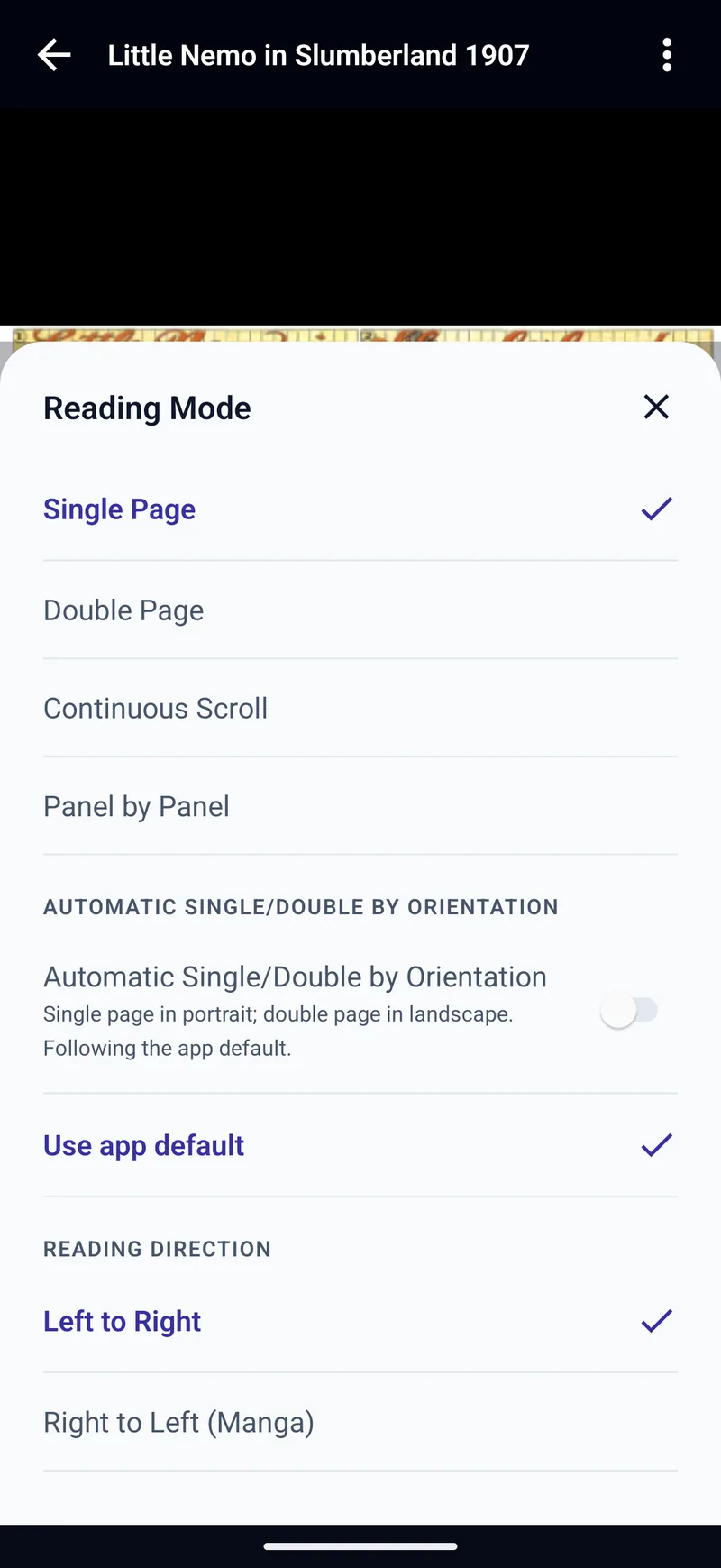
The Manga preset, spreads and panels
The Manga preset is one tap. On a phone held upright, Panel by Panel is often the more comfortable view: panels are found on the device, in right-to-left order, and nothing is uploaded. Set the panel direction to Right to Left (Manga) as well. Reading panel by panel on a phone covers Hide Surrounding Panels and pages the detector shows whole.
Turn the phone sideways and Double Page puts the first page of a pair on the right. PDF manga stays one page at a time, because Double Page is not available for PDF. If a scan is missing a page and the pairs split, Page Grouping can shift them. That is also in the manga guide linked above.
Files you already have
This is a reader for manga you already own as files: CBZ, RAR4 CBR, CB7, CBT, PDF and image-based DRM-free EPUB. It does not sell manga and it has no catalogue. A volume bought inside another company’s app is usually copy-protected and will not open here. A RAR5 CBR will not open either. Offline copies of your own files are covered in reading manga offline from your own files.
A webtoon or manhwa that is one long strip is a different reading mode. Use Continuous Scroll and Fit Width. There is no mode named Webtoon. Webtoons and vertical scroll explains that limit.
Komga, Kavita and the other phone
Local progress stays on the iPhone. Komga and Kavita write it back to the server, so an iPad or an Android phone on the same server can continue. OPDS, including Calibre, does not. iOS 17 or later on iPhone. The same app runs on iPad and on Android 7.0 or later. The iPad layout is the comic reader for iPad.
What to look for
A manga reader on a phone has to change the direction of the page turn, the spread and the panel order. A control that only flips a button, and leaves the panels running left to right, is a weaker fit. Also check that it reads files you already have, rather than only a shop, and that a vertical strip can scroll.
Panels says its reader covers manga and manhwa, with a vertical mode and a two-page view in landscape. Its iPad CBR page says right-to-left reading is built in for manga, and that the same app runs on iPhone and Mac. The premium guide lists panel-by-panel navigation as Premium, and lists double page and vertical scroll as free. It does not say whether right-to-left itself is free or Premium.
In TritonPanels, right-to-left pages, spreads and Panel by Panel are in the same subscription. There is no free version. Untranslated bubbles can be selected or translated on the device. That is a separate guide, translating comics and manga, and on iPhone it needs iOS 18 or later for Translate pages.
Price
A 14-day trial, then a subscription from €0.49 a month or €4.99 a year in Ireland. No ads and no TritonPanels account.
Frequently asked questions
How do I read manga right to left on iPhone?
In TritonPanels, choose the Manga preset, or open Reading Mode and set Reading Direction to Right to Left (Manga). Swipes, spreads and Panel by Panel follow that direction.
Does the Manga preset change panels as well as pages?
The preset is single page, right to left, for the book. Panel by Panel uses the same right-to-left direction when you set it.
Can I read manga I bought in another app?
Usually not. Those files are copy-protected and open in that store’s app. TritonPanels reads DRM-free CBZ, RAR4 CBR, CB7, CBT, PDF and image-based EPUB.
Does TritonPanels include a manga catalogue?
No. It reads files and servers you already have. It does not sell or supply manga, and it has no ads.
Will my place in a manga follow me to an iPad?
Only if both devices read the same Komga or Kavita server. A file that lives only on the iPhone keeps its progress on the iPhone. OPDS progress stays on the device.
Is the manga reader free?
No. There is a 14-day trial, then a monthly or yearly subscription. There is no account. iOS 17 or later is required.
Sources
Checked 16 October 2026. Claims about other apps come from the pages linked below. TritonPanels claims come from this site.
Read your comics with TritonPanels
A comic and manga reader for iPhone, iPad and Android. CBZ, CBR, CB7, CBT, PDF and image-based EPUB from your device, your cloud, a network share or your own Komga, Kavita or OPDS server — single page, spreads, continuous scroll or Panel by Panel. No ads, no account. 14-day free trial, then a monthly or yearly subscription.
Your own files: TritonPanels reads comics you already have. It does not sell, host or supply comics, and it cannot open copy-protected (DRM) purchases that are locked to another store’s app. Komga, Kavita, Calibre, Dropbox and the other names on this page belong to their owners, who do not endorse TritonPanels.